 Chiho AI
Telegram Response Time Analytics: Separate Waiting from Team Delay
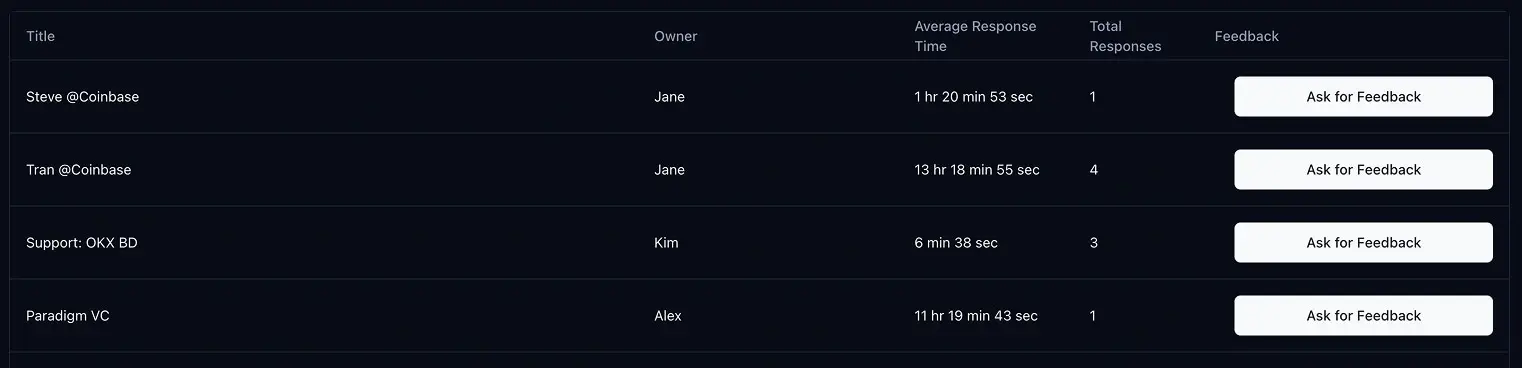
Telegram response-time analytics measure completed reply intervals; they do not, on their own, measure the customer's whole wait or explain an internal handover delay. Use Chiho's personal or team report alongside unresolved conversations and a short evidence worksheet before deciding what to change.
Calculation review: 3 October 2026. Product descriptions were checked against the report implementation and interface source. The worked cases are synthetic; no live-account performance study was conducted.
This guide covers your team's replies to customers. It does not estimate how long Telegram's own support service takes to answer account or platform questions.
Create a response-time report in Chiho
- Open Profile → Analytics and select Personal or the relevant team.
- Choose the date range you want to review.
- Select Create Report and wait for the report to finish.
- Review Overall Average Response Time, Total Messages, and the conversation rows.
- Use Export Data when you need to compare reports outside Chiho.
Keep the team selection, date range, and available conversation history consistent when comparing periods. A change in the set of connected accounts or collected messages can change the result without reflecting a change in how people work.
Understand what the current calculation measures
Chiho's current response calculation processes the available messages in time order. An incoming message starts a waiting interval. Another incoming message replaces that start time. The next message from the selected responding account or team ends the interval and records one response.
This means the interval runs from the most recent incoming message before the reply, not necessarily from the customer's first message. After recording a response, a further outgoing message does not create another interval until there is another incoming message.
A worked example
Imagine this fictional exchange:
- 10:00: the customer asks a question.
- 10:04: the customer adds a detail.
- 10:10: your teammate replies.
- 10:12: your teammate sends a second explanation.
The recorded response interval is 6 minutes, from 10:04 to 10:10. It is one response interval, not two. The customer's wait from the first message was 10 minutes, which answers a different question.
If another recorded interval is 14 minutes, the mean of those two intervals is 10 minutes: (6 + 14) ÷ 2. Use the example to interpret the metric rather than assuming it is a first-response service-level measure.
The report currently labels its response-interval count Total Messages. Interpret that number as measured replies, not as the total of every incoming and outgoing message.
Three limits to check before using the average
Unanswered messages are not completed response intervals
A customer who has not received a reply contributes no completed interval for that wait. A report can therefore look fast while unanswered conversations remain. Review the open queue alongside the average; zero recorded responses should not be interpreted as instant service.
Elapsed time includes time outside working hours
The calculation subtracts message timestamps; it does not apply a business-hours calendar. A customer message on Friday evening and a reply on Monday can have a long elapsed interval even if the team met its stated availability. Record operating hours when reviewing the results.
Group activity and available history affect interpretation
In a group, several people may contribute to the exchange. Check who counts as a responding team member and inspect the conversation before treating the interval as an individual employee's performance. Missing history and different reporting windows also limit comparisons.
Separate three clocks before diagnosing a slow conversation
A review becomes more useful when each timestamp answers a specific question:
- Recorded reply interval: the latest incoming message to the next qualifying reply. This is the interval described by Chiho's current calculation.
- Customer waiting age: the time from a customer question that still needs an answer to a stated review cutoff. Choose and record the question you are tracking; a later clarification need not erase that earlier need. This is a manual review measure here, not another field in the response report.
- Handover delay: the time between a documented request to transfer work and a documented acceptance by the next owner. This is a proposed team-review definition, not a metric calculated by the response report. If either event is missing, record unknown rather than attributing the whole response interval to handover.
These clocks can overlap. Do not add them together as though they were separate portions of a customer's wait. A long interval does not prove a handover failed, and a fast acknowledgment does not prove the issue was resolved. Use the team handover guide to record the question, owner, and next action that explain the timestamps.
Classify four synthetic cases
The following invented conversations are a calculation exercise, not customer results or a live Chiho test. All times are on one day in Asia/Singapore. Assume all listed Telegram messages are available within the report window and that each team reply qualifies for the selected scope. Internal handover events below are review notes, not additional Telegram messages fed into the calculation.
Case A: a clarification arrives during a handover
The customer asks at 10:00, then clarifies at 10:04. An internal note requests transfer at 10:02; the new owner explicitly accepts at 10:08. The team replies at 10:10 and adds detail at 10:12.
- Recorded reply interval: 6 minutes, 10:04–10:10; the second outgoing message adds no interval.
- Wait from the original question to the first reply: 10 minutes.
- Documented handover delay: 6 minutes, 10:02–10:08.
- Review decision: inspect what happened during transfer and whether the reply answered the question. The two six-minute values overlap and must not be summed.
Case B: the customer is still waiting
The customer asks at 11:00 and clarifies at 11:05. At the 11:30 review cutoff, there is no qualifying reply.
- Completed reply intervals: none; this wait contributes neither a response nor elapsed time to the average.
- Waiting age: 30 minutes from the unresolved 11:00 question, or 25 minutes from the latest message. This worksheet uses the first definition and records that choice.
- Handover delay: unknown because no transfer/acceptance pair was recorded.
- Review decision: find or confirm the next owner in the shared inbox workflow, then decide the next useful action. Do not treat omission from the response rows as proof that nothing is waiting.
Case C: an acknowledgment precedes the answer
The customer asks at 12:00. The team acknowledges at 12:02 and supplies the useful answer at 12:40, with no incoming message between those replies.
- Recorded reply interval: 2 minutes; the later answer adds no new interval.
- Time to the useful answer: 40 minutes, assessed manually from message content.
- Review decision: check whether the acknowledgment set an accurate expectation. The report does not classify a reply as useful, substantive, or resolved.
Case D: a customer reopens the issue
The customer writes at 13:00, receives a reply at 13:05, then reports at 14:00 that the problem remains. The team replies again at 14:20.
- Recorded reply intervals: 5 and 20 minutes, with a conversation mean of 12.5 minutes.
- Review decision: track the remaining problem and next update. The new incoming message starts another interval; it does not establish that Chiho identified a reopened support ticket.
Across these four cases, the four completed intervals are 6, 2, 5, and 20 minutes. Their overall mean is 8.25 minutes, or 8 minutes 15 seconds: (6 + 2 + 5 + 20) ÷ 4. Case B is still unanswered. Averaging the three conversation means instead would give a different, incorrect overall figure for this calculation because Case D contains two responses.
Use a review worksheet alongside the report
For each sampled conversation, record these fields in an access-controlled working document. They are suggested review fields, not a claim that Chiho exports every field:
- Scope: personal/team selection, relevant Telegram account, report ID/window, generation time, reviewer timezone, and review cutoff.
- Source question: the specific unresolved request and its timestamp, plus any later clarification. Retain only the context reviewers are authorized to access.
- Reply evidence: qualifying reply timestamp, recorded interval, and whether a useful answer or only an acknowledgment was provided.
- Ownership evidence: next owner, documented transfer and acceptance times, and unknowns. Do not infer acceptance from a changed name alone.
- Current outcome: waiting on the team, waiting on the customer, waiting on another dependency, or answered pending confirmation. These are review classifications, not automatic analytics categories.
- Decision: one next action, responsible person, and next check time. Use the support escalation workflow when another person must help resolve the issue.
Choose a slow completed interval, an unanswered question, and an acknowledged-but-unresolved question when those cases exist. This deliberately selected sample helps diagnose exceptions; it is not a representative service-quality score or evidence of a performance improvement.
Compare report windows without mixing their rows
The current analytics view can include saved report history. Conversation rows include a Report Window, and exported row data can contain multiple report IDs/windows. The headline average and count belong to the current report; do not assume every visible or exported row belongs to that same period. Isolate one report ID/window before recomputing a total, and keep the reporting scope consistent.
The date selection uses the browser's local start and end of day. Record that timezone when colleagues prepare comparisons. The response calculation uses elapsed timestamps and does not subtract nights, weekends, or holidays. If you separately calculate business-hour waiting time, document the calendar, timezone, and rule for out-of-hours arrivals; label it as your own measure rather than Chiho's reported average.
Messages outside the selected window cannot complete an interval inside the calculation. A question just before the window followed by a reply inside it can be omitted if the question is absent; a question near the end followed by a reply after the window remains incomplete there. Retrieved history and account availability also constrain coverage. Mark missing evidence explicitly instead of treating a narrow date range as a complete audit of every conversation.
Run a weekly review that leads to a specific action
Choose comparable periods and the same team scope. Record the average, counted response intervals, and which conversations appear in the report. Then inspect a small sample of slow exchanges and unanswered conversations.
For each sample, ask:
- Was someone clearly responsible for the next action?
- Did a handover lose the customer's question?
- Was the team waiting on information from another person?
- Did an automatic acknowledgment arrive quickly while the useful answer came much later?
- Did the exchange happen outside the team's stated working hours?
Choose one process change for the next period: make ownership explicit, clarify handover notes, or review unresolved issues at a set time. A change in the average alone does not tell you which intervention worked.
The shared Telegram inbox guide explains how to organize the queue. For conversations needing another action, use priority-based follow-ups.
Pair response speed with unresolved work
A quick acknowledgment and a resolved customer issue are different outcomes. Review the next action, the customer's latest question, and whether the issue is actually closed. Avoid optimizing the response metric by sending messages that do not help the customer.
The Telegram support escalation skill can help structure a review of conversations needing attention. Ask for a proposed escalation list and inspect the underlying messages before changing tasks or sending replies.
Common questions
Is this the average time until a customer's first reply?
The current calculation uses the latest incoming message before a qualifying outgoing reply. It is not a first-message-to-first-reply metric when the customer sends multiple messages in a row. Use the worked example above when explaining the report to teammates.
What is a good response time?
Set a target around your customers' expectations, operating hours, and the urgency of their requests. Compare similar conversations and review unanswered work alongside completed replies. A universal number would hide those differences.
Can I compare two teams directly?
Only with care. Check their conversation types, available history, working hours, volume, and sender definitions first. Use the comparison to find questions to investigate, rather than treating the average as a complete measure of service quality.
Try Chiho with a small reporting period, inspect several source conversations, and confirm what the metric means before using it in your team's review.