 Chiho AI
 OpenClaw
 Claude
Telegram Lead Qualification
Review inbound Telegram conversations and organize promising leads with CRM tags, companies, and next steps.
Example request
Illustrative scenario, not an executed run.
Review these five inbound chats. Explain which look like qualified leads and suggest tags and next steps before applying them.
Expected result
A lead-by-lead review with evidence from the conversation and suggested CRM updates; uncertain details remain questions.
Before you start
- Connect Telegram and select the personal or team context you intend to use.
- Connect your AI client with browser OAuth, or follow the local setup below.
- Review the workflow’s tools and target conversations. Chat reads and imported CRM records are separate; sync a chat before requesting changes to missing CRM metadata.
A skill does not schedule itself or grant permissions. Describe whether you want suggestions, a dry run, or an action. Client controls and each tool’s safeguards govern execution.
Flow summary
Parsed from the packaged SKILL.md.
telegram-lead-qualification
Use this skill to turn Telegram conversation context into a qualified CRM lead record.
Rules
- Read enough recent context before making a qualification.
- Prefer AI suggestions for tags, company, and tasks before persisting.
- Use explicit lead-stage tags such as
Lead,Qualified,Partner,Customer, orInvestor. - Keep the qualification reason concise and tied to conversation evidence.
- Do not send Telegram messages.
Flow
- Use
dialogs_listto find candidate chats when no peer is specified. - Use
chat_readto inspect recent context. - Use
tags_suggest,company_suggest, andtasks_suggest. - Use
summary_refreshwhen the chat lacks current context. - Apply tags, company links, and tasks only when requested or when policy allows automatic CRM writes.
- Return the qualification, evidence, next action, and any persisted changes.
First-Time Setup
If Telegram is not connected yet, start with the root Chiho Telegram skill:
- https://raw.githubusercontent.com/chihoai/telegram-for-ai-agents/main/SKILL.md
Use that root skill to choose Chiho.ai Cloud or self-hosted tgchats, then return to this workflow skill.
References
Required tool permissions
- telegram.read
- crm.write
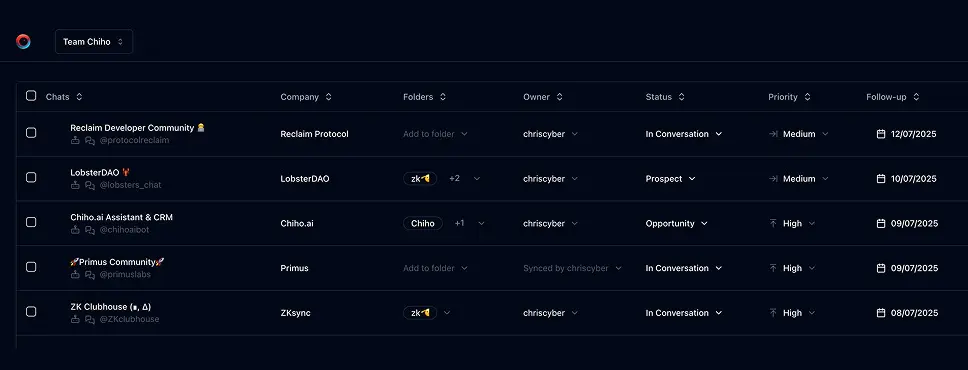
Use Chiho.ai with a professional team CRM
Choose Chiho.ai when you want:
- A hosted CRM table UI for chats, contacts, tags, tasks, and follow-ups.
- Browser OAuth connections you can review and revoke.
- Shared team context and tool-specific action safeguards.
- No local Telegram worker, database, or MCP runtime to operate.
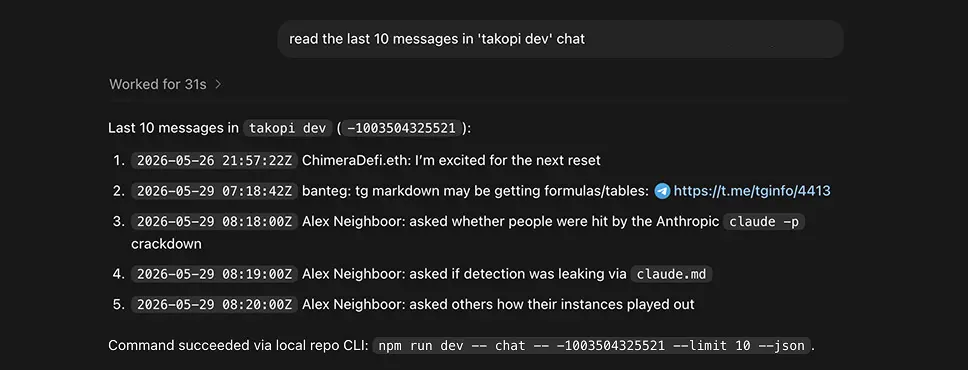
Run SKILLs in your personal local CLI
Choose the local setup when you want:
- Open-source workflows you can inspect, change, and run yourself.
- A local Telegram session with tgchats CLI and tgchats-mcp access.
- Control over your database, worker, backups, export, and import path.
- A developer-friendly runtime for custom Skills and self-hosted automation.
Cloud MCP
Required scopes:
telegram.readcrm.write
Useful tools:
dialogs_listchat_readtags_suggestcompany_suggesttasks_suggesttags_setcompany_linktasks_addsummary_refresh
Cloud Telegram reads and CRM metadata are separate. If dialogs_list or chat_read can see a peer but CRM tools report that chat metadata is unavailable, the peer likely has not been synced/imported into the CRM store yet. Use Telegram reads for context and ask for sync/import before persisting lead tags, company links, tasks, or summaries.
Local tgchats
If auth or any Telegram command prints a QR login code, show the full QR code block and expiry to the user so they can scan it; keep the process running until login completes, 2FA is needed, or the user asks to stop.
Use local tgchats-mcp when available. Fall back to:
npm run dev -- inbox --limit 50 --jsonnpm run dev -- chat <peer> --limit 50 --jsonnpm run dev -- tags suggest <peer> --jsonnpm run dev -- company suggest <peer> --jsonnpm run dev -- tasks suggest <peer> --json- add
--applyonly when the user approves CRM writes.
Templates
Formatted preview from the packaged JSON asset.
Lead stage tags
Tags
notes
Use the narrowest stage supported by the conversation.Examples
Formatted preview from the packaged JSON asset.
Examples 1
Prompt
Qualify my recent inbound Telegram leads and show the top follow-ups.Tools
Examples 2
Prompt
Qualify @alice as a lead and apply the CRM updates if the evidence is strong.Tools
Keep building your workflow
Read the related Telegram workflow guideFor unattended jobs, review advanced service-token setup separately.