 Chiho AI
Why Telegram Chat Counts Differ: Contacts, Dialogs, and CRM Rows
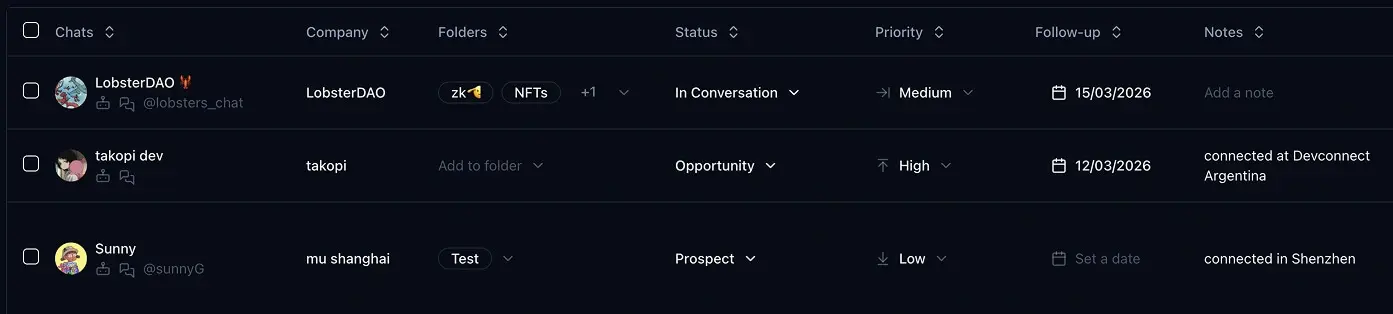
Telegram chat counts differ because a contact list, a live conversation list, a saved CRM inventory, and the rows currently visible on screen measure different things. Before calling a chat missing, compare the same Telegram account, access scope, folder coverage, and observation time. Then check whether pagination and synchronization have finished.
The existing Chiho product image above illustrates CRM rows and fields. It is not a screenshot of the count reconciliation below.
Checked 15 September 2026: Chiho behavior here is based on current source and documentation, not a live account audit. The worked numbers are fictional. Chiho publishes this guide; it does not report customer results or claim that matching totals prove a complete migration.
Check account coverage before an AI inbox briefing
In an MCP briefing, Chiho supplies authorized existing Telegram account conversations to Codex, Claude, or ChatGPT. Follow the MCP setup guide, authorize in the browser, verify identity and scope, and check inventory coverage before requesting message-level conclusions. Reading an account inventory is different from reading the messages in that inventory.
Keep a coverage worksheet with these fields:
- Scope: personal or team, selected connected account, and any account not included.
- Inventory source: contacts, live dialogs, saved CRM references, or current screen rows.
- Folders and pages: whether active and archived dialogs were included, which pages were consumed, and whether a continuation remains.
- Message selection: conversations actually read and the requested message window.
- Read outcome: returned messages, empty results, truncation, unavailable media, or a wait that stopped the read.
- Unresolved coverage: what the briefing cannot establish and the narrow next read needed.
Use inventory totals only with their own scope and definition. A page size is not an account total. Contacts do not substitute for active and archived dialogs, and saved CRM entries can cover a selected subset. A persisted sync state describes saved inventory progress; it does not establish that an AI client read every message.
Synthetic example: complete inventory, partial message review
These numbers are fictional. The selected account has 100 active dialogs and 20 archived dialogs after all inventory pages are consumed. A briefing selects three conversations, reads two within an agreed window, and stops before the third because Telegram requires a wait. An attachment in one returned conversation remains uninspected.
The correct coverage statement is: inventory includes 120 dialogs; the briefing has inspected messages in two of three selected conversations, within the stated window, with one attachment gap. It cannot claim that 120 conversations were reviewed or that no other unresolved requests exist. Respect a tool's returned wait before a later read; do not keep retrying during it.
For an inbox recipe, use recency and priority. For locating a specific fact, use message search. For an interrupted first read, use MCP troubleshooting. Keep counts and coverage on this page rather than turning it into another general briefing guide.
Start with a bounded inventory check and one authorized message read. Include the worksheet's gaps beside the briefing, so a reviewer can distinguish an observed absence from an unread portion. A missing message result does not authorize synchronization or prove that the underlying conversation is empty.
Name the inventory before comparing numbers
Contacts are entries in the Telegram account's address book. Telegram provides a separate contacts API. Someone appearing in a conversation does not make the conversation list an address-book count.
Dialogs are conversations in an account's Telegram dialog inventory. Telegram's dialog-list API accepts folder and pagination parameters. A returned page can contain fewer entries than the inventory total. Groups and channels also make a dialog inventory different from a list of individual customers.
Saved CRM dialogs are the dialog records Chiho has persisted for CRM use in the selected scope. They have a sync history. A saved total and a newly fetched Telegram total need not describe the same moment.
Visible rows are the entries a screen currently shows. A selected filter or an incomplete page can explain a smaller display without establishing that the underlying record is missing.
If you are deciding what information belongs in a CRM beyond the conversation itself, start with what a Telegram CRM does. Here, the immediate question is narrower: which inventory does each number describe?
Start with one account and one access scope
Write down the selected Telegram account and whether the view is personal or team-scoped. Do not compare one account's Telegram total with a team view that has different access boundaries. Record any search, status, or folder filter on the screen you are investigating.
For an AI client connected to Chiho, account_whoami identifies accessible accounts. Check its connection and reauthorization state before interpreting an absent result. A permission or connection error is an unavailable measurement, not a count of zero.
Chiho's live dialogs_list is unavailable to team-scoped tokens; the supported alternative is crm_dialogs_list, which reads persisted CRM inventory. That alternative does not turn the saved result into a live Telegram measurement. If the required scope is unavailable, record the limitation and ask an authorized account owner to perform the comparison. See the AI-agent connection guide for setup and access boundaries.
Compare active and archived dialogs separately
Chiho's inventory_summary returns live Telegram activeTotal, archivedTotal, and allTotal, alongside the independent CRM syncedTotal and lastSyncedAt. The Telegram section also records measuredAt.
Use telegramDialogs.allTotal when asking for the currently available Telegram dialog total. Do not substitute the number of items in a dialogs_list response. Keep active and archived counts in your worksheet so an archive-coverage difference is visible.
A live total is still an observation, not a frozen export. Conversations can change while you page through them. Compare observations taken close together and keep their timestamps. A later difference may require another bounded read, rather than a claim that records were lost.
Finish pagination before calling a list complete
A first page answers “what is on this page?” To inspect every returned dialog, follow nextCursor until it is absent, preserving the account and query scope. Record whether you actually reached that point.
For saved CRM dialogs, crm_dialogs_list.syncedTotal is independent of the current page length. If the inventory changes during CRM pagination, Chiho can reject the cursor and require pagination to restart. Treat that response as an interrupted observation; do not append the restarted first page to an old list and count duplicates as new conversations.
When comparing individual records, use the account and stable peer identity returned by the tool, including its kind where available. Display names alone are poor matching keys: two conversations can have the same title, and titles can change. Preserve only the minimal identifiers needed in an authorized diagnostic record.
Read sync status before attempting a repair
sync_status reads the latest run or a specified run without starting Telegram work. Inspect its mode, archive coverage, phase, progress, failures, and retry information alongside the inventory totals.
- queued or running: the run has not reached its terminal state. A partial saved inventory is not a final reconciliation result.
- waiting_for_telegram: inspect resumeAt. Chiho persists the wait and committed progress; scheduled work must not call Telegram before that time. Repeatedly requesting a sync is not a way around the wait.
- enriching: further processing is in progress. Do not infer that every CRM field or related detail is already populated.
- complete: the run is terminal, but inspect reported skipped and enrichment-failure counts. Completion does not establish that every enrichment task succeeded or that every message in history was imported.
- failed: preserve the run ID, phase, and error code. Report the failure before deciding on recovery.
Starting sync_once is a separate action that starts or resumes persisted sync work; it is not part of this read-only check. If an authorized operator later chooses full reconciliation, the documented configuration is full mode with archived dialogs included. Full mode also refreshes the contact snapshot and requires the separately granted telegram.contacts.read permission. A recent-mode run should not be presented as proof of complete inventory coverage.
Worked example: 50 rows does not mean 50 chats
The following is a synthetic worksheet, not an observed Chiho account or a performance test. Assume every observation concerns the same personal account and that the live totals remain stable during the check.
- Telegram active dialogs: 120.
- Telegram archived dialogs: 30.
- Telegram all dialogs: 150.
- Chiho saved CRM dialogs: 142, with its own recorded sync timestamp.
- Rows in the first CRM page: 50, with a continuation cursor.
- Telegram address-book contacts: 80, measured separately with contact access.
- Sync state: waiting_for_telegram, with a future resume time.
Here is what the worksheet supports:
- The live dialog total is 120 + 30 = 150.
- The 50 rows are one page. They do not establish a 100-chat loss.
- The saved total is 8 lower than the live total. This is an unresolved count difference, not proof that eight particular chats are missing.
- The 80 contacts are a different inventory. Do not subtract them from 150 to calculate missing customers.
- The waiting run has not finished. Record its retry time and inspect status again after the permitted resume point.
Even after a later completed run, equal totals would not prove that the two sets contain the same conversations. One absent peer and one stale extra peer can cancel numerically. If completeness matters, compare the actual peer sets after finishing pagination, then inspect differences within the authorized scope.
Copy this reconciliation worksheet
Use one record per account and scope. Leave unknown fields unknown instead of guessing.
- Question: Which specific conversation or count seems wrong?
- Account and access: Selected account; personal/team scope; connection state.
- Screen: Current search and filters; visible row count; whether more pages remain.
- Live dialogs: Active; archived; all; observation time; any read error.
- Saved dialogs: Synced total; last sync time; pagination completed or interrupted.
- Contacts, if relevant: Separate contact measurement; permission available or unavailable.
- Sync: Run ID; mode; archive coverage; state; phase; progress; skipped/failed work; resume time.
- Record comparison: Minimal stable peer identities present only on one side; time observed.
- Decision: Explained by scope/page/filter; waiting for completion; or unresolved discrepancy requiring investigation.
For example, “The customer chat is absent from the first page” calls for paging or a scoped lookup. “The same peer is absent from the completed saved inventory while present in the live inventory” is stronger evidence for investigation. A chat that is present but lacks a note is a field/context problem, which belongs in the team handover workflow, not in the dialog-total calculation.
Give an AI agent a bounded read-only task
After connecting Chiho to your client, use a request such as:
For the selected account, inspect account identity, inventory summary, and sync status. Report live active and archived totals separately from the saved CRM total, with timestamps and any access errors. Do not start a sync or send messages. If you need to list records, say whether pagination is complete. Do not infer contact counts from dialogs.
For a contact question, explicitly request a separate contact read only when that permission is available. For a team-scoped connection, accept that the live dialog-list tool is unavailable and report the saved inventory as saved.
Next step: open Chiho, choose the account you are investigating, and complete the worksheet for one concrete discrepancy. The useful outcome is an explained difference or a reproducible diagnostic record—not simply two numbers that happen to match.