 Chiho AI
 OpenClaw
 Claude
Telegram Conditional Reply Workflows
Plan and dry-run Telegram replies based on conversation context, tags, or follow-up state.
Example request
Illustrative scenario, not an executed run.
Dry-run a reply rule for these tagged chats. Show which conversations match and the proposed reply; do not execute it.
Expected result
A dry-run report of matching conversations and proposed replies, so you can check the rule before execution.
Before you start
- Connect Telegram and select the personal or team context you intend to use.
- Connect your AI client with browser OAuth, or follow the local setup below.
- Review the workflow’s tools and target conversations. Chat reads and imported CRM records are separate; sync a chat before requesting changes to missing CRM metadata.
A skill does not schedule itself or grant permissions. Describe whether you want suggestions, a dry run, or an action. Client controls and each tool’s safeguards govern execution.
Flow summary
Parsed from the packaged SKILL.md.
telegram-conditional-replies
Use this skill for rule-driven reply workflows.
Rules
- Start with dry-run or recommendation mode unless the user explicitly asks to enable execution.
- Prefer CRM tasks or draft replies before automatic sends.
- Read recent history before proposing reply conditions.
- Use explicit enablement and approval for any rule that sends Telegram messages.
- Do not create broad always-on reply rules without a narrow condition and audit path.
Flow
- Inspect existing rules with
rules_list. - Read target chats with
dialogs_listandchat_readwhen needed. - Add or adjust rule instructions with
rules_addif the user requests persistence. - On local tgchats, dry-run the rule with
rules_dry_run. Chiho Cloud does not expose that local-only tool, so inspect the proposed conditions and affected scope without running the rule. - Inspect outcomes with
rules_log. - Run the rule with
rules_runonly after the local dry-run or hosted review is acceptable and the user explicitly approves execution. - For actual replies, create a non-sending preview with
outbox_preview. After explicit approval, Chiho Cloud must callwrite_approve_previewand thenoutbox_send_approved; local tgchats callsoutbox_send_approvedafter the user approves.message_send_draftis a direct-send tool and must only be used when the user explicitly asks to send immediately.
Execution Boundary
Use rules_disable or rules_delete to stop or clean up persistent conditional reply rules. Until rules_update exists, replace a rule by creating a narrower new rule and deleting the old one after review.
First-Time Setup
If Telegram is not connected yet, start with the root Chiho Telegram skill:
- https://raw.githubusercontent.com/chihoai/telegram-for-ai-agents/main/SKILL.md
Use that root skill to choose Chiho.ai Cloud or self-hosted tgchats, then return to this workflow skill.
References
Required tool permissions
- telegram.read
- crm.write
- telegram.message.preview
- telegram.message.send
- telegram.batch.write
- automation.rules.write
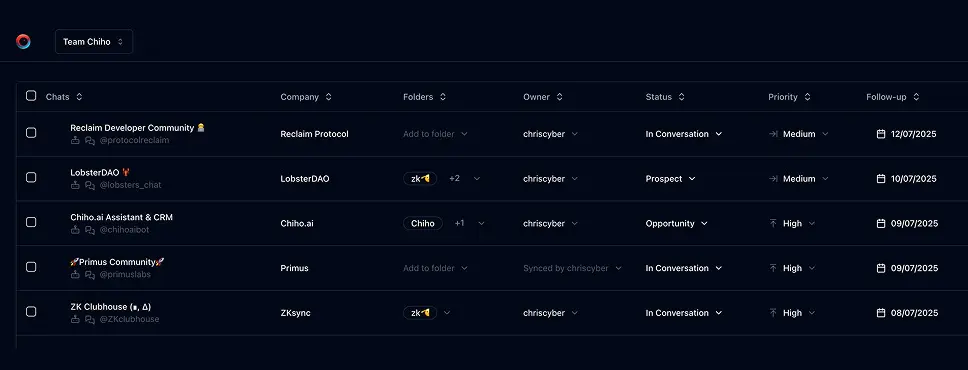
Use Chiho.ai with a professional team CRM
Choose Chiho.ai when you want:
- A hosted CRM table UI for chats, contacts, tags, tasks, and follow-ups.
- Browser OAuth connections you can review and revoke.
- Shared team context and tool-specific action safeguards.
- No local Telegram worker, database, or MCP runtime to operate.
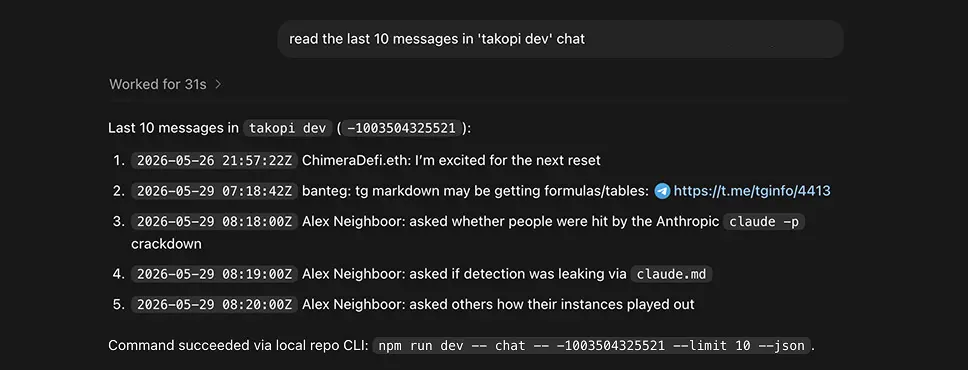
Run SKILLs in your personal local CLI
Choose the local setup when you want:
- Open-source workflows you can inspect, change, and run yourself.
- A local Telegram session with tgchats CLI and tgchats-mcp access.
- Control over your database, worker, backups, export, and import path.
- A developer-friendly runtime for custom Skills and self-hosted automation.
Cloud MCP
Required scopes:
telegram.readcrm.writetelegram.message.previewtelegram.message.sendtelegram.batch.writeautomation.rules.write
Read/CRM tools:
rules_listrules_addrules_runrules_logdialogs_listchat_read
Write tools for message execution:
message_send_draftoutbox_previewwrite_approve_previewoutbox_send_approved
Chiho Cloud does not expose the local-only rule dry-run tool. Review the rule conditions and affected scope before calling rules_run. Use outbox_preview for a non-sending message preview, call write_approve_preview only after explicit approval, and then call outbox_send_approved to execute the approved preview. Approval alone does not send. message_send_draft sends directly.
Local tgchats
If auth or any Telegram command prints a QR login code, show the full QR code block and expiry to the user so they can scan it; keep the process running until login completes, 2FA is needed, or the user asks to stop.
Use local tgchats-mcp for rule and read tools. For message execution:
message_send_draftoutbox_previewoutbox_send_approved
Always call rules_dry_run before rules_run for conditional reply workflows.
Use outbox_preview for a non-sending preview and call outbox_send_approved only after explicit approval. message_send_draft sends directly.
Templates
Formatted preview from the packaged JSON asset.
Availability check
Text
Hi {{first_name}}, thanks for the note. I can take a look and get back to you by {{date}}.Handoff reply
Text
Hi {{first_name}}, looping in {{colleague_name}} who can help with {{topic}}.Examples
Formatted preview from the packaged JSON asset.
OpenClaw
Prompt
Create a rule that drafts replies for chats tagged customer when they ask about pricing.Tools
Codex
Prompt
Run the reply rules and show me what would happen before sending anything.Tools
Claude Desktop
Prompt
Draft a conditional reply for this chat, but do not send it yet.Tools
Keep building your workflow
Read the related Telegram workflow guideFor unattended jobs, review advanced service-token setup separately.