 Chiho AI
 OpenClaw
 Claude
Telegram Template Messaging
Prepare a message template for selected Telegram chats and review recipients before sending.
Example request
Illustrative scenario, not an executed run.
Prepare this update for the chats I selected. Show the exact recipients and message text for review before any send.
Expected result
A preview of the selected recipients and message text. Sending is a separate authorized action.
Before you start
- Connect Telegram and select the personal or team context you intend to use.
- Connect your AI client with browser OAuth, or follow the local setup below.
- Review the workflow’s tools and target conversations. Chat reads and imported CRM records are separate; sync a chat before requesting changes to missing CRM metadata.
A skill does not schedule itself or grant permissions. Describe whether you want suggestions, a dry run, or an action. Client controls and each tool’s safeguards govern execution.
Flow summary
Parsed from the packaged SKILL.md.
telegram-bulk-template-message
Use this skill to send one approved template to multiple Telegram chats.
Rules
- Read or resolve the target audience first.
- Use packaged templates from templates.
- Never free-form bulk send when an approved template can satisfy the request.
- Always create a preview before execution.
- Respect recipient caps, skipped-recipient reasons, rate limits, and idempotency keys.
- If policy requires approval, stop after preview and ask the user to approve.
Cloud Flow
- Use
dialogs_listandchat_readas needed to resolve recipients. - Call
outbox_previewwith recipients and template/message text. - Show the preview summary: recipients, skipped targets, scheduled time, and risk.
- If approval is required, call
write_approve_previewwith thepreviewIdafter the user approves. - Call
outbox_send_approvedwith the approvedpreviewId. - Return the execution report and any failures.
Local Flow
Use the same MCP tool names as Cloud: outbox_preview followed by outbox_send_approved.
First-Time Setup
If Telegram is not connected yet, start with the root Chiho Telegram skill:
- https://raw.githubusercontent.com/chihoai/telegram-for-ai-agents/main/SKILL.md
Use that root skill to choose Chiho.ai Cloud or self-hosted tgchats, then return to this workflow skill.
References
Required tool permissions
- telegram.read
- telegram.message.preview
- telegram.message.send
- telegram.batch.write
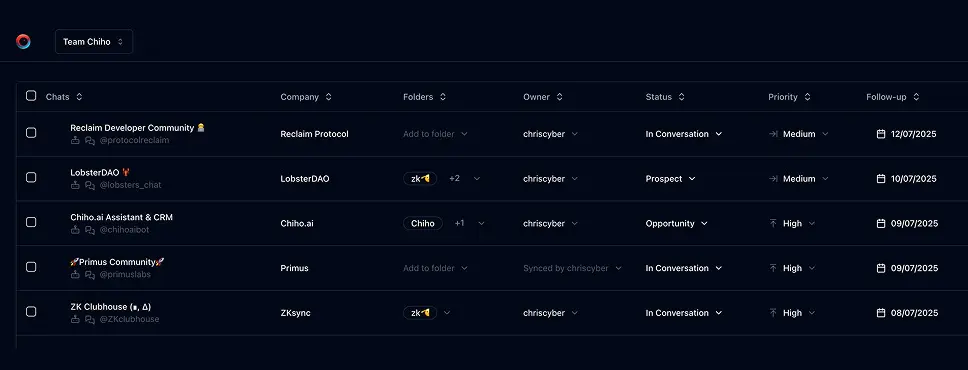
Use Chiho.ai with a professional team CRM
Choose Chiho.ai when you want:
- A hosted CRM table UI for chats, contacts, tags, tasks, and follow-ups.
- Browser OAuth connections you can review and revoke.
- Shared team context and tool-specific action safeguards.
- No local Telegram worker, database, or MCP runtime to operate.
Run SKILLs in your personal local CLI
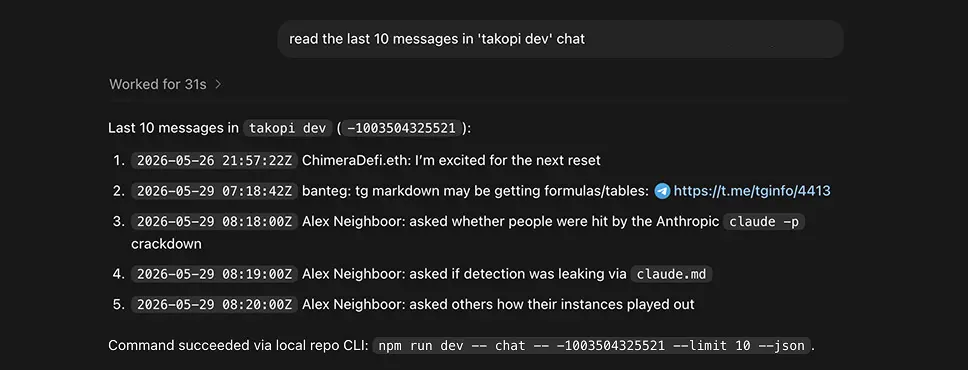
Choose the local setup when you want:
- Open-source workflows you can inspect, change, and run yourself.
- A local Telegram session with tgchats CLI and tgchats-mcp access.
- Control over your database, worker, backups, export, and import path.
- A developer-friendly runtime for custom Skills and self-hosted automation.
Cloud MCP
Required scopes:
telegram.readtelegram.message.previewtelegram.message.sendtelegram.batch.write
Tools:
dialogs_listchat_readoutbox_previewwrite_approve_previewoutbox_send_approved
Approval behavior depends on token and team policy. Even with never_ask, create a preview first so the run has audit, idempotency, skipped-recipient reporting, and rate-limit metadata. When approval is required, call write_approve_preview after the user reviews the preview, then call outbox_send_approved; approval alone does not send.
Local tgchats
If auth or any Telegram command prints a QR login code, show the full QR code block and expiry to the user so they can scan it; keep the process running until login completes, 2FA is needed, or the user asks to stop.
Use local tgchats-mcp when available. The local MCP exposes the same tool names as Chiho.ai Cloud:
outbox_previewoutbox_send_approved
The preview is persisted next to the local Telegram session so a later outbox_send_approved call can execute by previewId.
Templates
Formatted preview from the packaged JSON asset.
Short follow-up
Text
Hi {{first_name}}, quick follow-up on {{topic}}. Is this still useful to discuss this week?Event update
Text
Hi {{first_name}}, sharing a quick update about {{event_name}}: {{update_summary}}Examples
Formatted preview from the packaged JSON asset.
OpenClaw
Runtime
chiho-cloudPrompt
Send the short follow-up template to the selected investor chats after previewing it.Tools
Codex
Prompt
Prepare a preview for the event update template for these five peers, then stop for approval.Tools
Claude Desktop
Prompt
Use Chiho MCP to preview a batch Telegram update for the listed chats.Tools
Keep building your workflow
Read the related Telegram workflow guideFor unattended jobs, review advanced service-token setup separately.