 Chiho AI
 OpenClaw
 Claude
Telegram CRM Exports
Prepare selected Telegram CRM records for a handover, follow-up report, or operational review.
Example request
Illustrative scenario, not an executed run.
Prepare an export of the selected customer CRM records with tags and open tasks. Show the fields and scope before exporting.
Expected result
A scoped export plan or output containing only the requested CRM fields, ready to inspect before sharing.
Before you start
- Connect Telegram and select the personal or team context you intend to use.
- Connect your AI client with browser OAuth, or follow the local setup below.
- Review the workflow’s tools and target conversations. Chat reads and imported CRM records are separate; sync a chat before requesting changes to missing CRM metadata.
A skill does not schedule itself or grant permissions. Describe whether you want suggestions, a dry run, or an action. Client controls and each tool’s safeguards govern execution.
Flow summary
Parsed from the packaged SKILL.md.
telegram-crm-export
Use this skill to gather CRM slices for export, audit, reporting, or team handoff.
Rules
- Clarify export scope before collecting data.
- Prefer filtered exports over full account exports.
- Do not include session files, API hashes, or private auth material.
- Treat exported chat content as sensitive.
- Local full backup uses
tgchats exportoutside MCP.
Flow
- Determine filters: tag, company, query, peer, date range, task status, or summary kind.
- Use read tools to preview the export scope.
- For local full exports, call the documented CLI export command outside MCP.
- Return file location, record counts, included fields, and privacy notes.
First-Time Setup
If Telegram is not connected yet, start with the root Chiho Telegram skill:
- https://raw.githubusercontent.com/chihoai/telegram-for-ai-agents/main/SKILL.md
Use that root skill to choose Chiho.ai Cloud or self-hosted tgchats, then return to this workflow skill.
References
Required tool permissions
- telegram.read
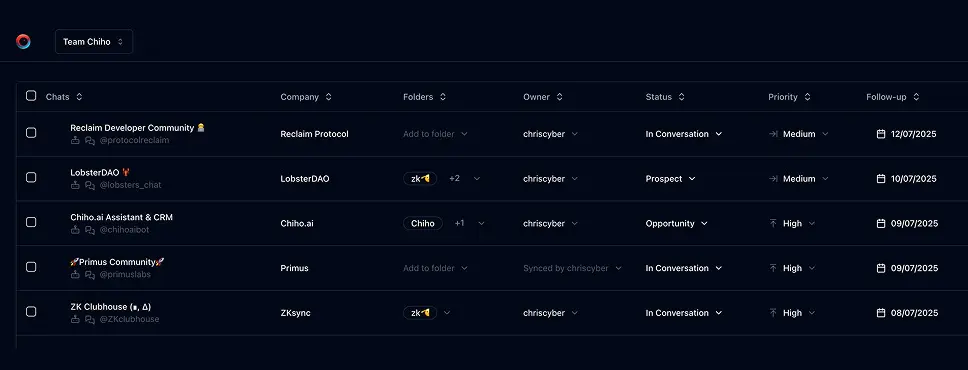
Use Chiho.ai with a professional team CRM
Choose Chiho.ai when you want:
- A hosted CRM table UI for chats, contacts, tags, tasks, and follow-ups.
- Browser OAuth connections you can review and revoke.
- Shared team context and tool-specific action safeguards.
- No local Telegram worker, database, or MCP runtime to operate.
Run SKILLs in your personal local CLI
Choose the local setup when you want:
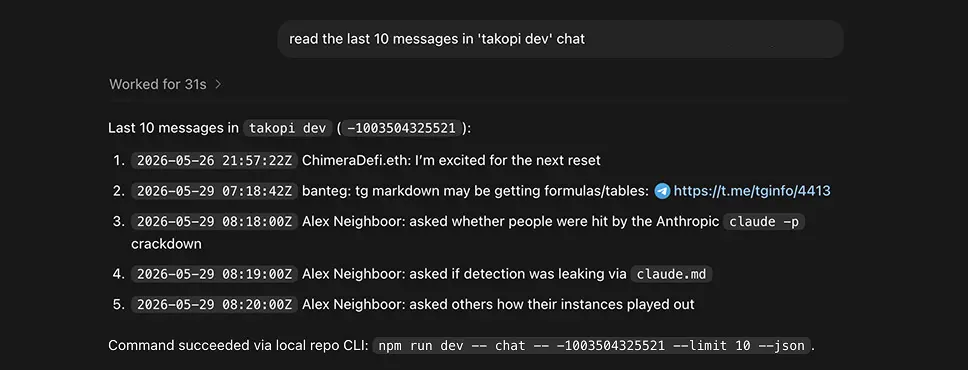
- Open-source workflows you can inspect, change, and run yourself.
- A local Telegram session with tgchats CLI and tgchats-mcp access.
- Control over your database, worker, backups, export, and import path.
- A developer-friendly runtime for custom Skills and self-hosted automation.
Cloud MCP
Required scopes:
telegram.read
Useful tools:
search_messagesdialogs_listchat_readtags_getcompany_gettasks_todaysummary_show
Cloud Telegram reads and CRM metadata are separate. If dialogs_list or chat_read can see a peer but CRM tools report that metadata is unavailable, that peer likely has not been synced/imported into the CRM store yet. Continue with Telegram reads where possible and ask for sync/import before treating the peer as export-ready CRM data.
Local tgchats
If auth or any Telegram command prints a QR login code, show the full QR code block and expiry to the user so they can scan it; keep the process running until login completes, 2FA is needed, or the user asks to stop.
Use local tgchats-mcp for previews. For full local backup/export, use:
npm run dev -- export --format json --out ./exports/backup.json
Keep TELEGRAM_SESSION_PATH, session strings, and API credentials out of exported artifacts.
Templates
Formatted preview from the packaged JSON asset.
BD handoff export
Fields
Examples
Formatted preview from the packaged JSON asset.
Examples 1
Prompt
Export all Lead chats with summaries and open follow-up tasks.Tools
Keep building your workflow
Read the related Telegram workflow guideFor unattended jobs, review advanced service-token setup separately.