 Chiho AI
 OpenClaw
 Claude
Telegram Investor Follow-ups
Organize investor conversations and prepare update tasks or message drafts from existing context.
Example request
Illustrative scenario, not an executed run.
Review the investor chats I selected. List outstanding questions and suggest an update task for each; do not send anything.
Expected result
A review of unanswered investor questions and proposed update tasks, with optional drafts kept for review.
Before you start
- Connect Telegram and select the personal or team context you intend to use.
- Connect your AI client with browser OAuth, or follow the local setup below.
- Review the workflow’s tools and target conversations. Chat reads and imported CRM records are separate; sync a chat before requesting changes to missing CRM metadata.
A skill does not schedule itself or grant permissions. Describe whether you want suggestions, a dry run, or an action. Client controls and each tool’s safeguards govern execution.
Flow summary
Parsed from the packaged SKILL.md.
telegram-investor-updates
Use this skill to keep investor Telegram relationships organized and ready for updates.
Rules
- Treat investor communications as sensitive.
- Use previews for any update draft.
- Prefer summaries and tasks over automatic messages.
- Tag investors only when requested or when existing evidence is strong.
Flow
- Find investor chats by tags, search, or recent dialogs.
- Read context and refresh summaries.
- Identify last touch, promised follow-ups, and next update timing.
- Create tasks for missing updates or next steps.
- Preview update language only when requested.
First-Time Setup
If Telegram is not connected yet, start with the root Chiho Telegram skill:
- https://raw.githubusercontent.com/chihoai/telegram-for-ai-agents/main/SKILL.md
Use that root skill to choose Chiho.ai Cloud or self-hosted tgchats, then return to this workflow skill.
References
Required tool permissions
- telegram.read
- crm.write
- telegram.message.preview
Use Chiho.ai with a professional team CRM
Choose Chiho.ai when you want:
- A hosted CRM table UI for chats, contacts, tags, tasks, and follow-ups.
- Browser OAuth connections you can review and revoke.
- Shared team context and tool-specific action safeguards.
- No local Telegram worker, database, or MCP runtime to operate.
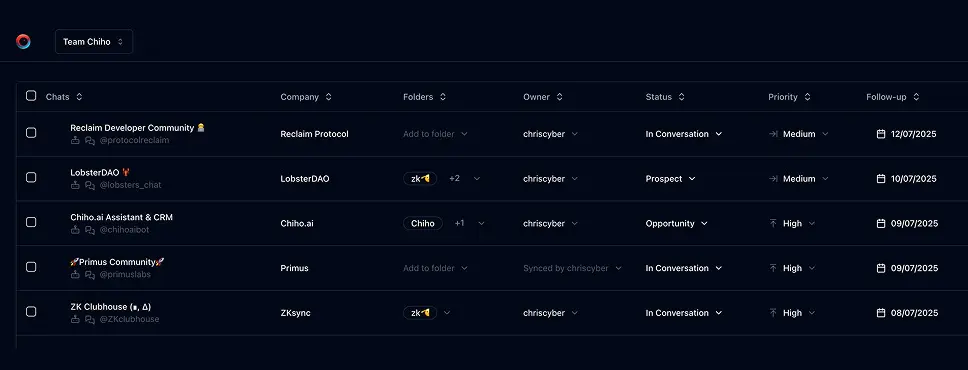
Run SKILLs in your personal local CLI
Choose the local setup when you want:
- Open-source workflows you can inspect, change, and run yourself.
- A local Telegram session with tgchats CLI and tgchats-mcp access.
- Control over your database, worker, backups, export, and import path.
- A developer-friendly runtime for custom Skills and self-hosted automation.
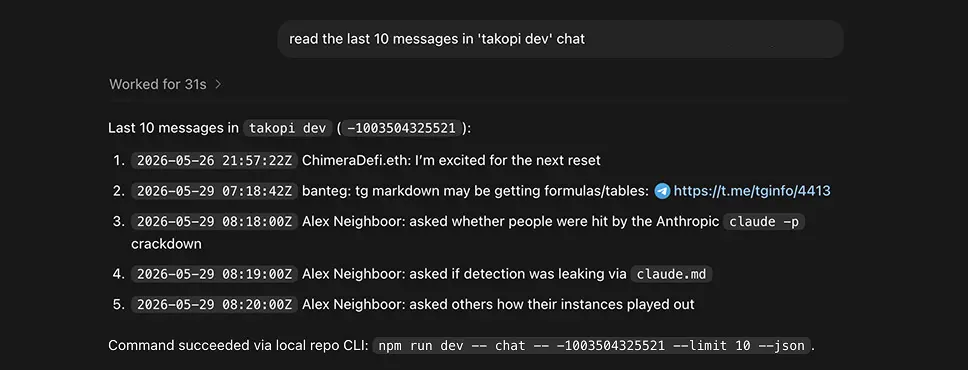
Cloud MCP
Required scopes:
telegram.readcrm.writetelegram.message.previewfor update previews
Useful tools:
search_messageschat_readsummary_refreshtasks_addnudge_generateoutbox_preview
Cloud Telegram reads and CRM metadata are separate. If CRM tools report that chat metadata is unavailable for a peer that chat_read can access, the peer likely has not been synced/imported into the CRM store yet. Use Telegram reads for context and ask for sync/import before persisting investor CRM metadata.
Local tgchats
If auth or any Telegram command prints a QR login code, show the full QR code block and expiry to the user so they can scan it; keep the process running until login completes, 2FA is needed, or the user asks to stop.
Use local tgchats-mcp when available. Fall back to:
npm run dev -- search "investor" --limit 50 --jsonnpm run dev -- chat <peer> --limit 50 --jsonnpm run dev -- summary refresh <peer> --jsonnpm run dev -- tasks add <peer> --due <date> --why "<investor follow-up>" --json
Templates
Formatted preview from the packaged JSON asset.
Investor follow-up categories
Categories
Examples
Formatted preview from the packaged JSON asset.
Examples 1
Prompt
Find investor chats that need an update and create tasks.Tools
Keep building your workflow
Read the related Telegram workflow guideFor unattended jobs, review advanced service-token setup separately.