 Chiho AI
Telegram Batch Messaging: Check Recipients and Partial Outcomes
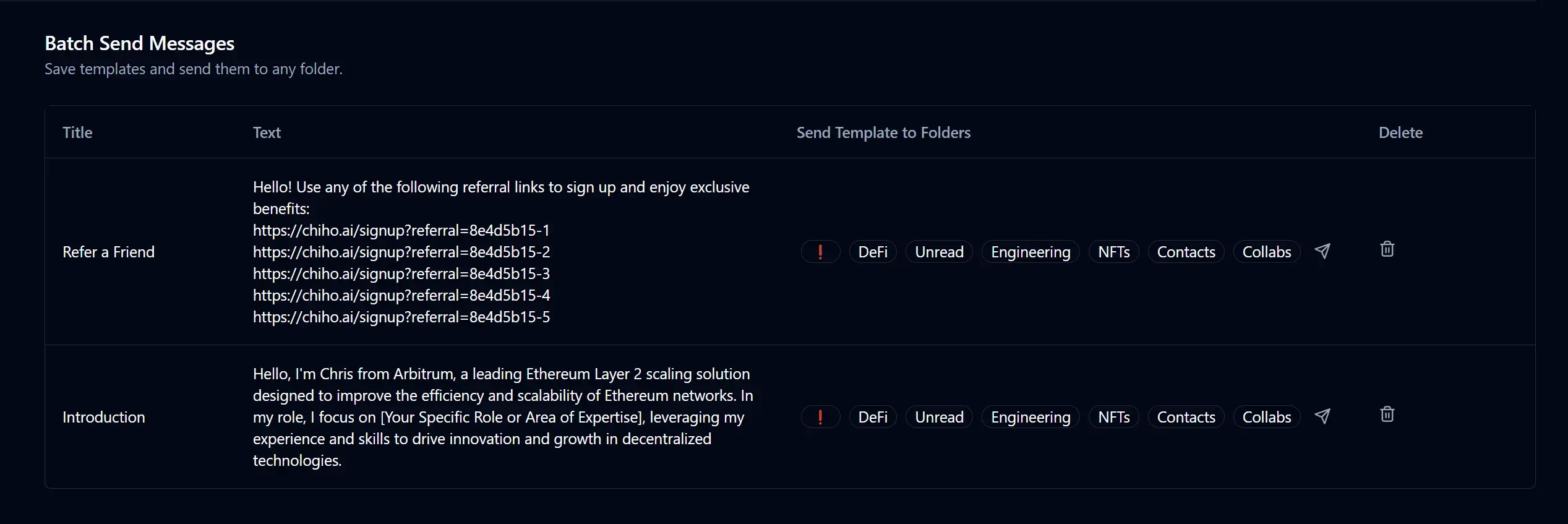
Telegram batch messaging means preparing one message for several selected conversations. For a professional team, the important work is checking who should receive it and reconciling what happened to each recipient afterward. A successful batch request is not proof that every message was sent, read, or welcomed.
This guide covers a controlled batch workflow in Chiho: select expected recipients, review the resolved list and message, use the required authorization path, then separate successful, failed, skipped, pending, and uncertain outcomes before considering a retry.
Start with a reason for each recipient
A useful batch might notify existing customers who requested an update about the same maintenance window. A folder of contacts is only an organizational aid; it does not establish that everyone in it expects the same message.
Telegram's official Spam FAQ asks users to contact people who expect their messages and explains that unwanted messages can lead to account restrictions. A smaller batch or slower send rate does not make unwanted outreach acceptable.
Before selecting chats, write down the shared purpose, the relevant customer request or relationship, and any exclusions. Remove people who declined further updates, already received the information, or need a different answer. If you cannot explain why a recipient belongs, leave that conversation out.
For ongoing sales work, use the priority follow-up guide to decide who needs attention before preparing a batch. The Telegram CRM guide explains how conversation context fits the wider workflow.
Resolve the audience before reviewing the message
Names can be duplicated, folders can change, and a selected conversation may be unavailable to the connected account. Review exact recipients rather than approving only a count such as “send to five customers.”
In Chiho's agent outbox workflow, outbox_preview resolves the requested recipients and stores a proposed action without sending it. Its result includes the recipient list and count, skipped recipients, a message preview, expiry, and whether approval is required. Creating that stored preview changes Chiho state even though it does not send a Telegram message.
Check these details together:
- The connected account and personal or team context are the intended ones.
- Each resolved chat matches the customer conversation you selected.
- Skipped entries have an understood reason; they are not counted as successful sends.
- The displayed text applies to every resolved recipient.
- Any schedule matches the intended time and time zone.
- The preview is still valid and the latest conversation has not changed the decision.
The current agent preview accepts at most 20 requested recipients. This is a Chiho guardrail for that path, not a universal Telegram allowance or a guarantee that a batch will complete. Team execution also requires one Telegram session owner per approved batch; resolve account ownership rather than combining unrelated sending accounts.
Keep shared wording separate from individual facts
Use a common message only where its facts are common. A service notice can share a confirmed maintenance window, but a customer's refund, renewal price, delivery date, or contract commitment needs its own verified context.
For example, this is a fictional drafting example, not a customer result:
“Following your request for maintenance updates, the confirmed maintenance window is Tuesday, 14:00–15:00 Singapore time. We will send a separate update if that window changes.”
That wording is ready only if the recipient requested updates, the window is confirmed, and the sender has accepted the follow-up commitment. Do not reuse the sentence merely because it sounds plausible. Replace relative dates with an exact calendar date in a real message, and check that any links are appropriate for every recipient.
Use the message templates guide for reusable wording, then review the final text against the selected conversations. Keep internal notes and another customer's details out of the message.
Check the actual approval requirement
For the agent outbox path, multiple resolved recipients require approval. A single-recipient preview also requires approval when the connection uses the always-ask mode or the preview is high risk; skipped recipients can make a preview high risk. Read the returned approval requirement rather than inferring it from the original selection count.
This does not mean every Chiho agent write waits for a new approval screen. Permissions and safeguards vary by operation and connection, and client tool controls matter. A request to “draft only” is an instruction, not a technical restriction on sending. Review the AI-agent connection guide before enabling write tools.
The team message queue and agent outbox are separate workflows. Follow the relevant message approval checklist, verify the approved payload, and review material changes again. Do not treat an earlier approval as permission for a different audience or revised promise.
Reconcile outcomes per recipient
Record the existing preview or run identity and batch ID when returned. Then inspect the per-recipient report. A summary such as completed_with_errors means the work needs reconciliation; it does not identify which conversations should be retried by itself. An accepted result is not proof of completed sending.
Use this worksheet in your own controlled records. These categories are review decisions, not a promise that every product screen uses the same labels:
- Successful send reported: record the supporting result. Exclude that recipient from a fresh resend. A send result does not establish that the person read the message.
- Explicit failure: record the error and whether any send occurred. Check whether a retry is appropriate after the cause is resolved.
- Skipped during resolution: inspect why the recipient was excluded. Correct scope or identity only when authorized, then review the corrected selection.
- Pending or scheduled: inspect the existing operation and its schedule. Do not start an immediate duplicate because the message has not appeared yet.
- Uncertain outcome: inspect the existing run and the relevant conversation before deciding. A timeout alone does not prove that no message was sent.
The worksheet should connect each intended recipient to a known outcome and a next action. Restrict access to the operational record; do not copy customer identities or message contents into public reporting.
A partial batch is not a reason to resend everything
Consider a synthetic five-recipient exercise. Two recipients have successful send results, one has an explicit failure, one was skipped before sending, and one has an uncertain outcome after a timeout. These are illustrative categories, not observed Chiho performance.
Keep the two successes out of a new send. Investigate the explicit failure and skipped entry separately. Check the uncertain recipient's existing operation before any retry. The next action may be no send at all if the customer has since replied, withdrawn the request, or received the update through another authorized route.
If retrying is appropriate, review only the unresolved recipients that are now eligible. Preserve enough of the original run record to explain the relationship. Starting a fresh preview creates a new proposed operation; it is not a substitute for reconciling the first one.
Treat runtime restrictions as authoritative
Chiho's limits reference describes conservative pacing for agent writes, but static limits are not a delivery promise. Telegram can return flood-wait responses and other restrictions at runtime. Respect the reported wait and inspect the existing operation before taking further action.
Do not repeatedly submit the same batch, switch accounts to bypass a restriction, or interpret a successful request as proof that every recipient received a message. If a tool cannot expose enough evidence to distinguish pending work from failure, pause the affected recipients and resolve that uncertainty first.
Review one controlled batch before expanding
Start with authorized test conversations and a message whose facts you can verify. The acceptance check is practical: can you explain every selected recipient, every exclusion, the authorization used, and the outcome for each attempted send?
To explore the workflow in Chiho, create an account, review the Telegram template messaging workflow, and prepare a controlled preview. Sending is a separate decision. Keep the first exercise small enough to reconcile manually, and proceed only when recipient identity, permissions, and outcome evidence are clear.