 Chiho AI
How to Evaluate a Telegram Follow-Up Workflow: A 20-Case Protocol
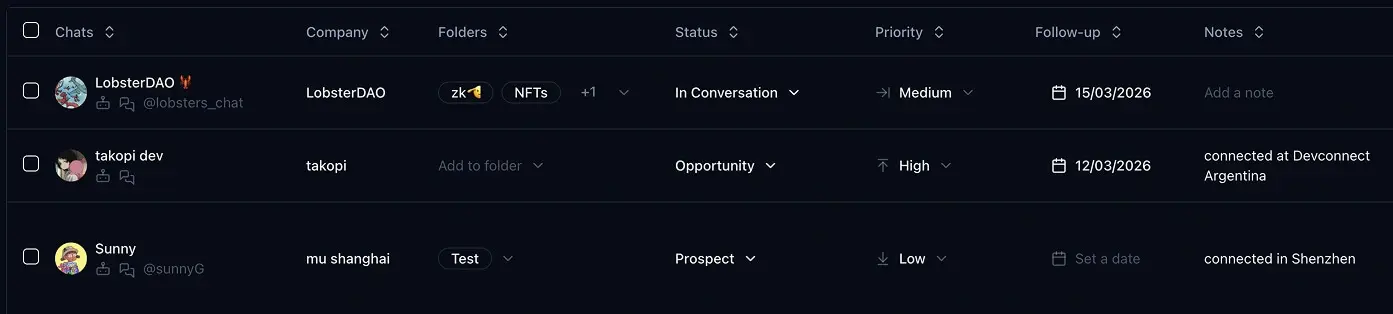
Compare Telegram follow-up workflows by giving each one the same conversations, the same decision rules, and the same timed tasks. Score missed actions and incorrect priorities alongside speed. A faster workflow that overlooks a customer commitment has not passed the test.
The existing Chiho product image above illustrates CRM fields; it is not a screenshot of this evaluation.
This is an evaluation protocol, not a completed study. It includes 20 synthetic conversation cases and a scoring key. No participants have been timed, no customer data was used, and no results or time-saving claims are reported. Prepared on 12 September 2026.
Publisher disclosure: Chiho publishes this protocol and is one of the workflows you can evaluate. Product references below were checked against Chiho source and documentation, not a live customer workspace. Keep the same acceptance rules for every workflow, including one you already use.
Add a separate source-grounding round for an MCP workflow
Chiho MCP supplies an AI client with authorized existing Telegram account conversations. It can support a source-backed review in Codex, Claude, or ChatGPT after installation and browser authorization, identity verification, and a bounded read. This protocol's fictional cases are not stored customer conversations and must not be uploaded into a real account to make a test appear live.
Keep the original 20-case decision exercise intact. Add a separate, versioned round that tests how a reviewer handles evidence coverage. The original clock and answer key still govern the original exercise; this round has its own four perturbations and denominator.
- Missing attachment, based on C08: provide a reference to an attachment, but no contents. The reviewer must mark it unverified and specify the additional authorized inspection needed.
- Changed date, based on C14: include an older due-date statement and its later correction. The conclusion must use the correction and identify the superseded source.
- Draft without delivery, based on C15: provide a draft and no sent-message result. The reviewer must keep the commitment unresolved and distinguish preparation from execution.
- Cross-chat confusion, based on C20: supply similar labels for two fictional conversations with different owners. The handover must retain the correct source and cannot borrow accepted ownership from the other case.
Use supplied fictional source cards for an offline reasoning exercise. A separate end-to-end tool test requires an authorized non-production fixture whose setup and teardown are documented. This article does not supply a fixture importer or claim that these cases ran through Chiho. If a required read, media operation, or scoped task cannot be represented safely, record a feasibility gap and keep the result at protocol level.
Ask the operator for a conclusion, its supporting card references, an explicit unknowns list, and a proposed next step. Score four independent checks for each perturbation: correct scope, source-supported conclusion, preserved uncertainty, and respect for the read/write boundary. Report each check as a count out of four, with failed cases and reasons. Do not combine this into the original 20-case action-recall denominator or call it a measured product accuracy score.
Freeze the allowed inputs and tool permissions before evaluation. Record fixture version, product revision if used, read-window limits, unavailable pages or media, and any interruption. Separate source retrieval, summary generation, proposed tasks, saved tasks, and sent messages in the evidence record. A write test needs separate authorization and a non-production destination; a read-only round cannot establish write reliability.
Use cross-conversation comparison, source-backed summaries, and task triage as separate workflow references. Start by reviewing the synthetic pack and expected unknowns. Publish the protocol and acceptance criteria until authorized observations exist; report later results with their actual sample and execution limits.
Decide what the comparison is meant to answer
Use this exercise to ask: can an operator identify today's required actions, distinguish urgent work from recent chatter, and leave a usable handover?
It does not measure message delivery, customer satisfaction, revenue, or long-term adoption. For the underlying workflow, read how to prioritize Telegram leads and follow-ups. If you are still selecting a product category, start with the Telegram CRM buying guide.
Write down two conditions before starting:
- Manual baseline: your normal Telegram workflow plus whatever tracking aid you actually use, such as a spreadsheet. Record the aid; do not remove it to make the baseline artificially weak. Telegram documents chat folders for organizing conversations, but this exercise does not assume folders alone store every required handover field.
- Chiho condition: the same available conversation information organized using the CRM fields and notes you intend to use. Current source describes status, priority, notes, and follow-up dates. Confirm these in your evaluation environment; do not assume that a reminder date sends a customer reply or that recording an owner automatically grants account access.
If a required function is unavailable, record that limitation. Do not silently give one condition extra context or a hidden assistant.
Build a safe, equivalent test pack
The cases below are fictional briefs, not exported Telegram messages. They support a paper or local mock exercise immediately. A mock exercise evaluates your proposed information layout; it cannot establish that a deployed product performs the workflow.
For an actual interface comparison, first obtain a separate, authorized non-production environment that can represent the same facts. Confirm the fixture path works without contacting real customers. This protocol does not provide a Chiho fixture importer or claim that one exists. If you cannot represent a case equivalently, stop the interface comparison and report a feasibility gap.
Use a fixed clock: 12 September 2026, 10:00 Asia/Singapore. All deadlines below use that timezone. Treat each numbered case as one conversation. The operator is Alex; Jo is the receiving teammate. Keep the answer key out of the operator's test pack.
Give both conditions the same initial facts. Start with equal access to any pre-existing notes; count new tagging, field entry, and cleanup as setup time. Record software versions or commit, device, participant experience, fixture version, and test date. Exclude real names, phone numbers, account identifiers, and production credentials from the pack and report.
The 20 synthetic conversation cases
The short statements are the complete information available for this exercise. A request to stop contact overrides any older follow-up date. An internal check is an action even when a customer message would be inappropriate.
- C01 — overdue quote: Alex promised a revised quote by 11 September, 17:00. No revision or later message exists.
- C02 — morning commitment: Alex promised a document by today, 11:00. It is not ready yet.
- C03 — requested check-in: The customer asked Alex to check back today. No time was specified.
- C04 — future appointment: The customer requested contact on 14 September, 10:00. There is no other open request.
- C05 — closed: The customer confirmed resolution yesterday. No next step remains.
- C06 — do not contact: An old reminder is due today, but the latest customer message says to stop contacting them.
- C07 — recent chatter: A friendly message arrived at 09:59. It contains no question or commitment.
- C08 — missing attachment: At 09:00 the customer asked Alex to resend an attachment today. No resend exists.
- C09 — waiting until tomorrow: The customer promised an answer on 13 September. No action is due before then.
- C10 — blocked internally: Alex promised an update today. Finance has not confirmed the answer. Check internally before composing a customer update.
- C11 — unowned commitment: A document was promised for today. The previous owner left and nobody accepted the work. Alex must arrange ownership today.
- C12 — explicit urgent deadline: A customer decision requires Alex's answer by 10:30 today. No answer exists.
- C13 — stale priority: A conversation marked high priority was resolved yesterday. Nothing remains open.
- C14 — changed date: An older note says today, but the latest customer message moves the check-in to 15 September.
- C15 — unsent draft: Alex promised a reply today. A draft exists; there is no sent reply.
- C16 — ambiguous timing: The only next step says “follow up soon.” No date was agreed. Alex must clarify the timing internally today.
- C17 — afternoon commitment: Alex promised a proposal by 16:00 today. It is unfinished.
- C18 — already completed: A reminder remains set for today, but the promised document was sent and acknowledged at 09:30. No further request exists.
- C19 — older unanswered request: A customer asked yesterday for a corrected invoice today. No correction exists.
- C20 — handover risk: Alex promised an update tomorrow at 10:00, but goes off shift today at 12:00. Jo has not accepted the handover. Alex must prepare and secure it today.
Freeze the decision rule before timing
For this exercise, “action today” means an unresolved commitment due today or earlier, an explicit internal clarification needed today, or a handover needed before Alex leaves. It does not always mean “send a message.”
Use three operational buckets: urgent now, action today, and no action today. Urgent now means overdue or due by 11:00 today. These are test rules, not Chiho's automatic priority algorithm or an industry benchmark.
The facilitator's answer key is:
- Urgent now: C01, C02, C12.
- Action today, excluding urgent now: C03, C08, C10, C11, C15, C16, C17, C19, C20.
- No action today: C04, C05, C06, C07, C09, C13, C14, C18.
There are 12 required actions, including the three urgent cases. C06 must never enter a customer-send list. C10, C11, C16, and C20 need internal work first. C15 is unfinished despite its draft; C18 is finished despite its reminder. Those distinctions test whether the operator reads the latest state rather than treating a field as unquestionable truth.
Run three tasks with explicit timing boundaries
First allow an untimed practice round on different cases. Record practice duration. Freeze the allowed tools, time limits, and assistance policy before the scored round. Keep setup time separate, but include it in the final report so a polished preconfigured view does not conceal its preparation cost.
Task 1: find the work. Start the clock when the operator opens the prepared list. Ask them to submit every case needing action today, with a one-line next step. Stop on submission, or at a predeclared 10-minute limit. Keep the submitted list unchanged for scoring.
Task 2: set priority. On a fresh copy of the full 20-case list, start the clock and assign one of the three buckets to every case. Stop on submission, or at five minutes. Score independently from Task 1 so an omission in the first list does not hide a priority error.
Task 3: prepare a handover. Start with C10 and C20 visible. Ask the operator to write a handover for Jo that includes the case ID, current state, commitment and deadline, next internal action, proposed owner, and whether that owner has accepted. Stop when both notes are submitted, or at 10 minutes. Jo is a proposed recipient, not an assumed confirmed owner. See the team handover guide for the broader operating routine.
These time limits are protocol choices, not product benchmarks. Log interruptions and tool failures. If a task reaches its cap, mark it incomplete and preserve the partial output; do not drop it from the results.
Score accuracy before interpreting speed
Keep the raw task outputs and use these definitions:
- Missed actions: required IDs absent from Task 1, out of 12.
- Unnecessary actions: submitted Task 1 IDs belonging to the eight no-action cases. Report the count and IDs.
- Priority errors: cases assigned a bucket different from the key, out of 20. Count an unassigned case as an error.
- Unsafe proposed contact: any proposed customer message for C06. Report separately even if another score looks good.
- Handover completeness: one point for each of the six requested fields per case, out of 12. A field earns its point only when consistent with the brief; invented acceptance earns zero.
- Elapsed time: seconds for each task, setup, and practice, reported separately. A capped task is incomplete at its limit, not a successful completion time.
Before testing, choose acceptance thresholds suited to your operation. A strict example is zero missed actions, zero unsafe proposed contacts, and all handover fields correct. Label it your acceptance rule. Do not collapse everything into a weighted “winner” score chosen after seeing the results.
Reduce learning effects and disclose what remains
With more than one operator, alternate which workflow is tested first and report the order for each person. Use a second matched pack with changed fictional labels and dates but the same decision structure, and alternate which pack goes with which workflow. Freeze both answer keys before the first scored run. Publish the second pack if you use it.
With one operator and one pack, reusing the answers creates a substantial learning effect. Report the exercise as a demonstration of that operator's workflow, not evidence of average customer performance. Counterbalancing reduces an order problem; it does not turn a small convenience sample into a representative study.
If an AI assistant is included, make it a separately named condition. Record the model, prompt, visible inputs, permissions, generated output, and human corrections. Chiho permissions are action-specific: some authorized writes can execute directly; batch sends and sensitive membership operations have additional controls. Do not assume every write pauses for approval. Keep this exercise draft-only or read-only, and use the AI-agent connection guide to check the intended access before testing.
A blank report you can copy
Use one record per operator and condition. Leave measurements blank until observed; zero means an observed zero, not “not tested.”
- Test date, fixture version, software version, and device:
- Operator experience, workflow order, and allowed aids:
- Setup and practice time:
- Task 1 elapsed time, completion status, submitted IDs, missed IDs, unnecessary IDs:
- Task 2 elapsed time, completion status, and incorrect buckets:
- Task 3 elapsed time, completion status, notes, and completeness score:
- Unsafe proposed contact, failures, interruptions, and assistance:
- Acceptance rule, pass/fail decision, and unresolved limitations:
Publish neutral and unfavorable observations too. Preserve anonymized raw outputs so another reviewer can reproduce the scoring. Response-time analytics answer a different question about conversation timestamps; use the response-time guide separately rather than presenting this task timer as a customer-response metric.
Next step: choose a workflow and run a permitted mock exercise with the supplied pack. If Chiho is on your shortlist, explore Chiho and confirm a safe evaluation setup before attempting the interface trial. The useful outcome is an explicit list of what works, what fails, and what still needs verification—not a promised productivity gain.