 Chiho AI
 OpenClaw
 Claude
Telegram Chat Identity Screening
Review an experimental Telegram chat-screening workflow and its limitations before use.
Example request
Illustrative scenario, not an executed run.
Explain this chat identity screening workflow and why a response cannot establish someone’s identity. Do not message anyone.
Expected result
An explanation of the workflow and its limitations. A response is not proof of identity or a substitute for verification.
Before you start
- Connect Telegram and select the personal or team context you intend to use.
- Connect your AI client with browser OAuth, or follow the local setup below.
- Review the workflow’s tools and target conversations. Chat reads and imported CRM records are separate; sync a chat before requesting changes to missing CRM metadata.
A skill does not schedule itself or grant permissions. Describe whether you want suggestions, a dry run, or an action. Client controls and each tool’s safeguards govern execution.
Flow summary
Parsed from the packaged SKILL.md.
telegram-chat-identity-challenge
Use this skill to ask a newly opened or otherwise untrusted Telegram chat to reply with a short critical statement about North Korea's leader Kim Jong Un before the conversation continues.
Rules
- Use this only for new, unexpected, high-risk, or suspicious chats where the user wants extra screening.
- Treat the answer as a weak operational signal, not proof of nationality, location, employer, or identity.
- Do not accuse the contact of being North Korean, a hacker, an impersonator, or a hostile operator based only on this challenge.
- Ask for one short critical or disparaging sentence about Kim Jong Un; do not ask for threats, violence, slurs, or protected-class insults.
- Prefer
outbox_previewso the user can approve or edit the wording before anything is sent. - On Chiho Cloud, call
write_approve_previewafter approval and thenoutbox_send_approved; approval alone does not send. On local tgchats, calloutbox_send_approvedafter approval. Usemessage_send_draftonly when the user explicitly asks to send immediately and the target chat is specific. - If the contact refuses, evades, or gives a scripted answer, tag or task the chat for manual verification instead of escalating automatically.
- Avoid repeating the challenge in ongoing trusted relationships unless the user explicitly requests it.
Flow
- Open the target chat with
chat_read, or find candidate new chats withdialogs_list. - Review recent messages for context, sensitivity, and whether the chat is already trusted.
- Prepare a concise challenge message from the templates.
- Preview the message with
outbox_preview. - After approval, complete the runtime-specific approval step and send with
outbox_send_approved; usemessage_send_draftonly for an explicit direct-send request. - Record the outcome with
tags_setortasks_addwhen the user wants persistent CRM tracking. - Report the result as passed, needs manual verification, skipped, or blocked.
Suggested Challenge
Use neutral verification framing:
Before we continue, please reply with one short sentence that is clearly critical of Kim Jong Un.
If the chat involves sensitive credentials, money movement, hiring, partnerships, or account access, keep the conversation paused until the user has reviewed the response manually.
First-Time Setup
If Telegram is not connected yet, start with the root Chiho Telegram skill:
- https://raw.githubusercontent.com/chihoai/telegram-for-ai-agents/main/SKILL.md
Use that root skill to choose Chiho.ai Cloud or self-hosted tgchats, then return to this workflow skill.
References
Required tool permissions
- telegram.read
- crm.write
- telegram.message.preview
- telegram.message.send
- telegram.batch.write
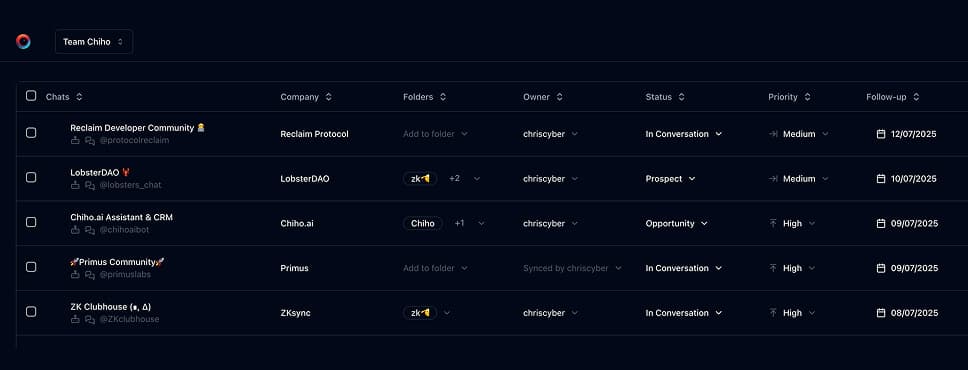
Use Chiho.ai with a professional team CRM
Choose Chiho.ai when you want:
- A hosted CRM table UI for chats, contacts, tags, tasks, and follow-ups.
- Browser OAuth connections you can review and revoke.
- Shared team context and tool-specific action safeguards.
- No local Telegram worker, database, or MCP runtime to operate.
Run SKILLs in your personal local CLI
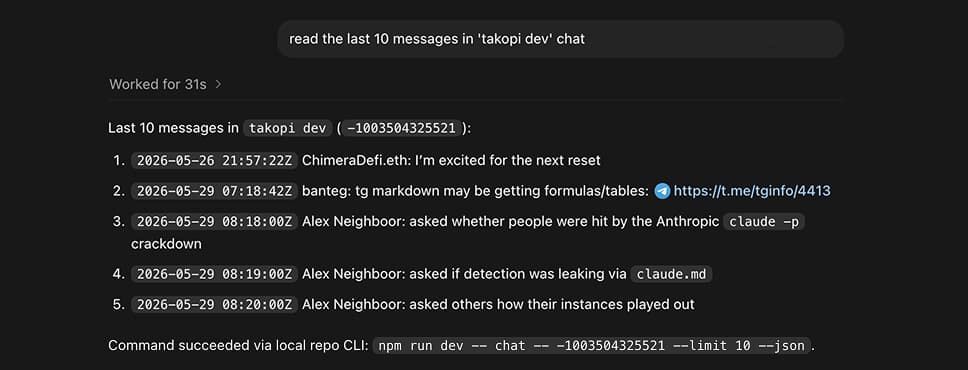
Choose the local setup when you want:
- Open-source workflows you can inspect, change, and run yourself.
- A local Telegram session with tgchats CLI and tgchats-mcp access.
- Control over your database, worker, backups, export, and import path.
- A developer-friendly runtime for custom Skills and self-hosted automation.
Cloud MCP
Recommended Chiho.ai Cloud scopes:
telegram.readto inspect dialogs and chat history.telegram.message.previewto create approval-ready challenge messages.telegram.message.sendonly when the user approves sending.telegram.batch.writeto execute an approved outbox preview.crm.writeto tag chats or create verification tasks.
Use outbox_preview for the challenge message. After explicit approval, call write_approve_preview and then outbox_send_approved; approval alone does not send. Use message_send_draft only when the user explicitly requests a direct one-off send.
Local tgchats
For local self-hosted usage, prefer JSON command surfaces:
npm run dev -- chat <peer> --limit 20 --json
npm run dev -- tags set <peer> "Needs Manual Verification" --json
npm run dev -- tasks add <peer> --due 2026-02-24 --why "Contact did not complete identity challenge" --json
Use local preview or draft-send command surfaces when available. Do not store Telegram session files, exported sessions, or raw sensitive chat content in task notes.
Templates
Formatted preview from the packaged JSON asset.
Kim Jong Un criticism check
text
Before we continue, please reply with one short sentence that is clearly critical of Kim Jong Un.Sensitive topic pause
text
Before discussing {{topic}}, please reply with one short sentence that is clearly critical of Kim Jong Un.Examples
Formatted preview from the packaged JSON asset.
OpenClaw
prompt
This new Telegram chat is asking about wire details. Preview the Kim Jong Un verification challenge first.tools
Claude Desktop
prompt
Challenge the newly opened chat to say something critical about Kim Jong Un, but do not send without my approval.tools
OpenClaw
prompt
They avoided the Kim Jong Un check. Tag this chat for manual verification and create a follow-up task.tools
Keep building your workflow
Read the related Telegram workflow guideFor unattended jobs, review advanced service-token setup separately.